
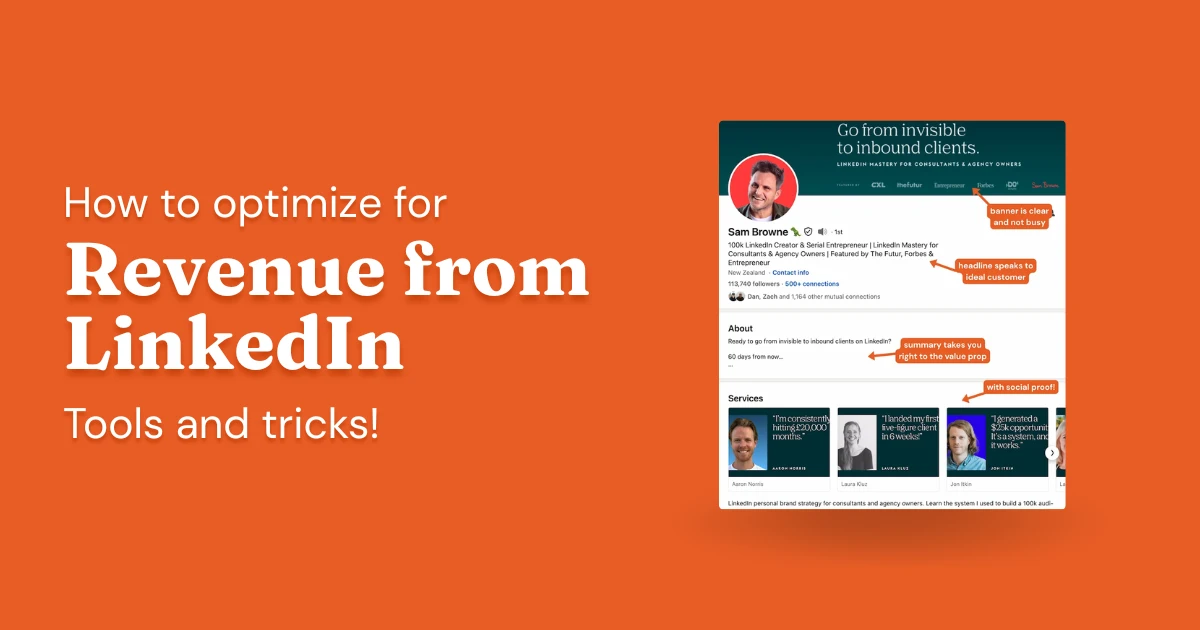
LinkedIn rewards profiles that are built for a specific audience. The people getting consistent inbound, high acceptance rates on their connection requests, and sales conversations that start with "I've been following your content" didn't stumble into that position. They built it deliberately.
A well-built profile compounds in four ways:
- Inbound leads arrive warm: prospects who found your profile have already made up their minds about you before you speak
- Outbound converts better: a weak profile undercuts even a strong pitch; a strong one pre-sells you
- Search visibility improves: the right keywords in the right fields put you in front of people actively looking for what you offer
- Your connection graph compounds: the more aligned your network, the better LinkedIn's algorithm distributes your content
- Start with your audience analytics: you can't improve what you don't measure
- Engagement rate matters more than raw impressions, but always consider context
- Your visual brand should align with the type of client you want to attract
- Who you engage with on LinkedIn matters as much as what you post
- Strategic engagement (not random scrolling) is the fastest path to profile growth
1. Start By Reviewing Your LinkedIn Profile Analytics
Before touching anything on your profile, look at who's already there. You'll make better decisions with data than with guesses, and your follower demographics are the most underutilized starting point on LinkedIn.
Pull up the demographics of your current followers:
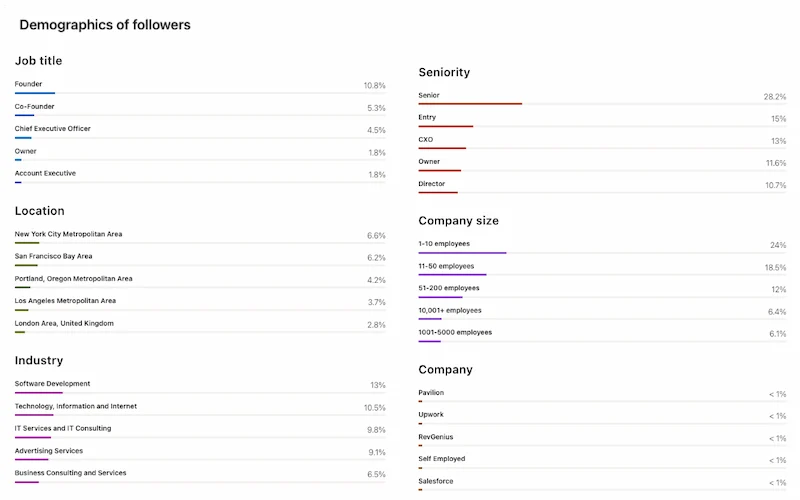
Four things to do once you see the numbers:
- If the follower profile doesn't match your target client (e.g., you're followed mostly by founders but want to reach enterprise directors), treat this as a signal: you need to shift who you connect with and engage with daily. Start by disconnecting from your least-relevant connections — enough to shift the signal, not enough to gut your reach.
- If your followers already match who you want to reach: stay the course. Keep creating for those people and keep engaging in the spaces they occupy.
- Company Size matters, too. If the bulk of your followers work at 1–10 person companies but your content speaks to enterprise pain points, there's a mismatch worth closing. Adjust either your content angle or your outreach targets.
- Use location data to sharpen your posting schedule. If most of your engagement comes from the US East and West coasts, post when New Yorkers are heading to lunch and Californians are just getting to their desks.
Next, look at your overall metrics dashboard:
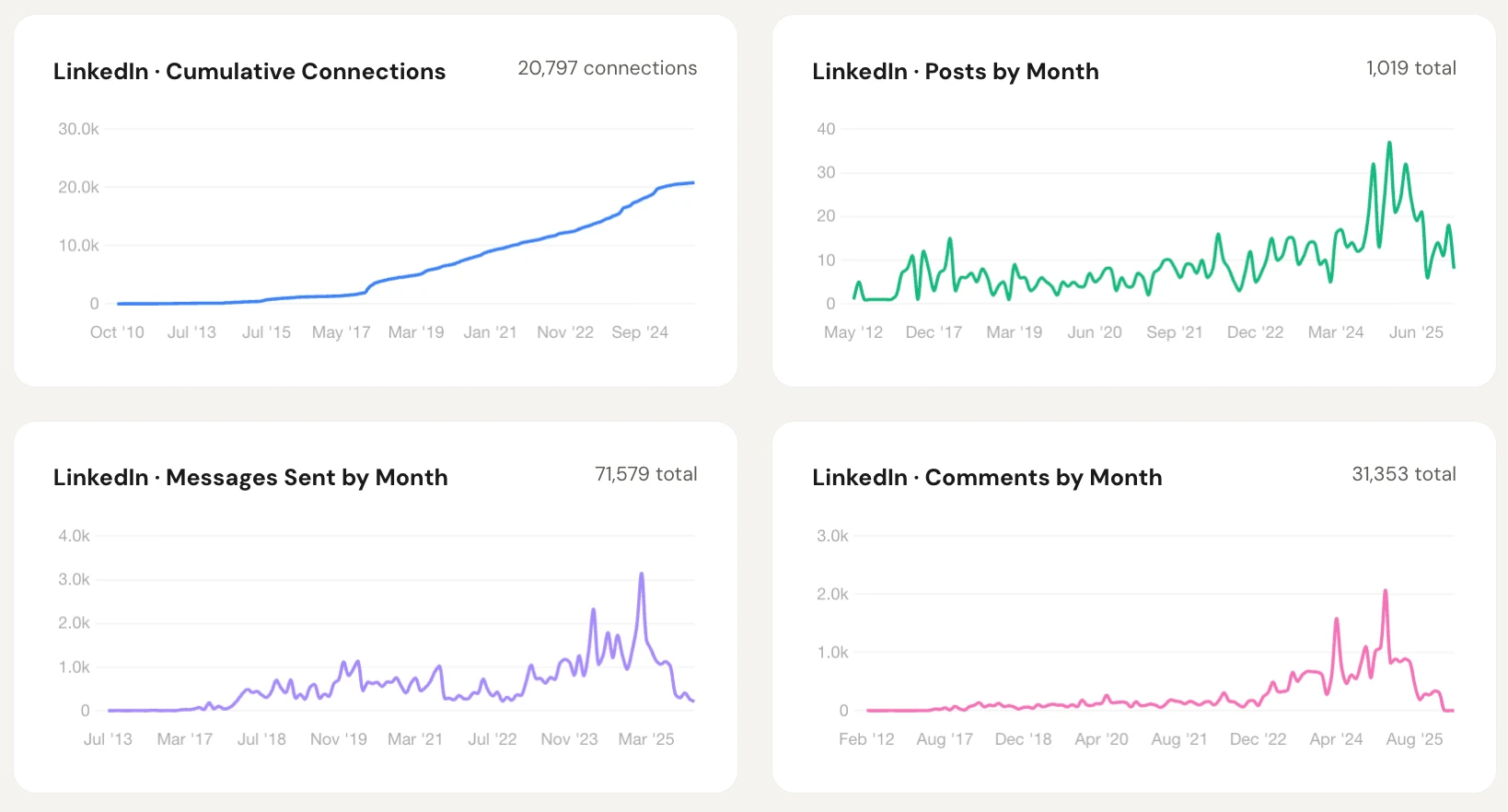
The metrics worth tracking: impressions, engagement rate, comments (both received and left), reactions, shares, new followers, new connections, and direct messages. Together they let you build a clear baseline, spot what's not working, and decide where to push harder.
2. Consider Your LinkedIn Post Performance
Your content is the highest-leverage variable in profile optimization. The more clearly you understand what's working, the less guesswork you rely on.
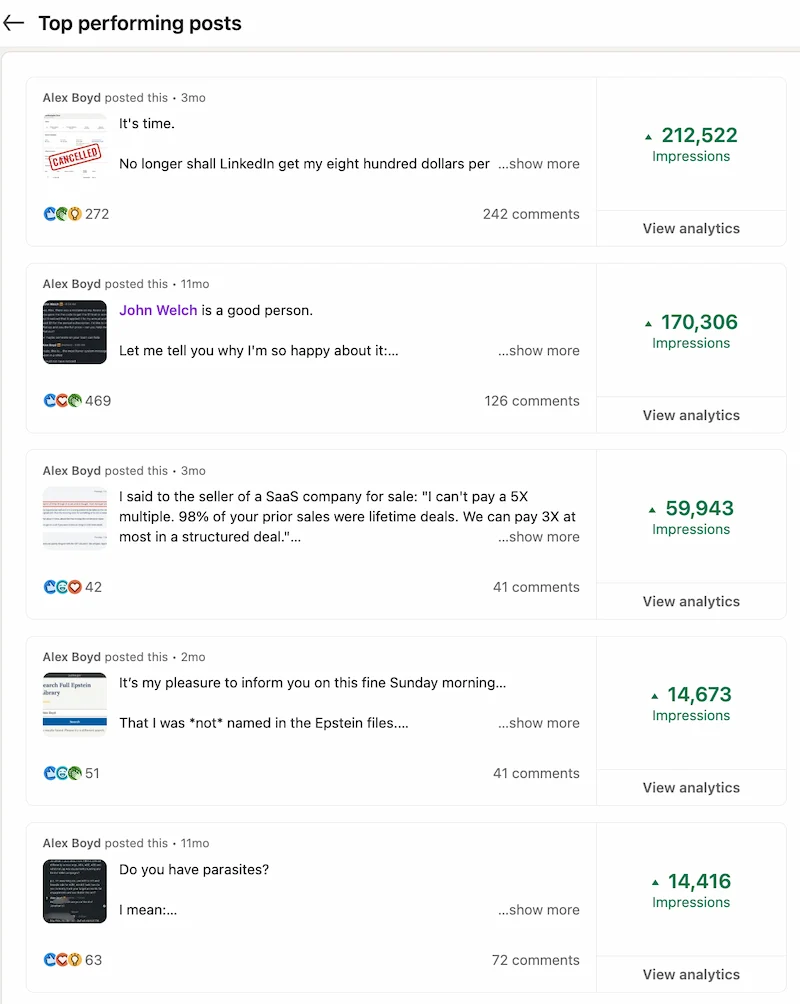
The four numbers worth tracking per post:
- Impressions: Total views your post received, a raw measure of how far it traveled
- Reactions: Likes, Celebrates, Loves, and other responses; a signal of resonance
- Comments: One of the strongest positive signals to LinkedIn's algorithm (note: your own comments count toward the total)
- Engagement rate: Total interactions (reactions, comments, reshares) expressed as a percentage of impressions
Reach gets a lot of attention but engagement rate tells you more. The catch: you have to read it in context.
- Posts that stayed close to home tend to show 8–10%+ engagement: your first-degree connections saw it and responded. The signal is real, the distribution was small.
- Posts that spread to a secondary ring typically settle in the 2–5% range — a healthy mix of people who know you and people who don't yet.
- Viral posts (50k+ impressions) routinely drop below 1%. The algorithm served it to people far outside your network, most of whom had no context for who you are.
Depending on your goals, filter your content to find out what works for you:
3. Refresh Your Style With LinkedIn Graphics & Carousel Design
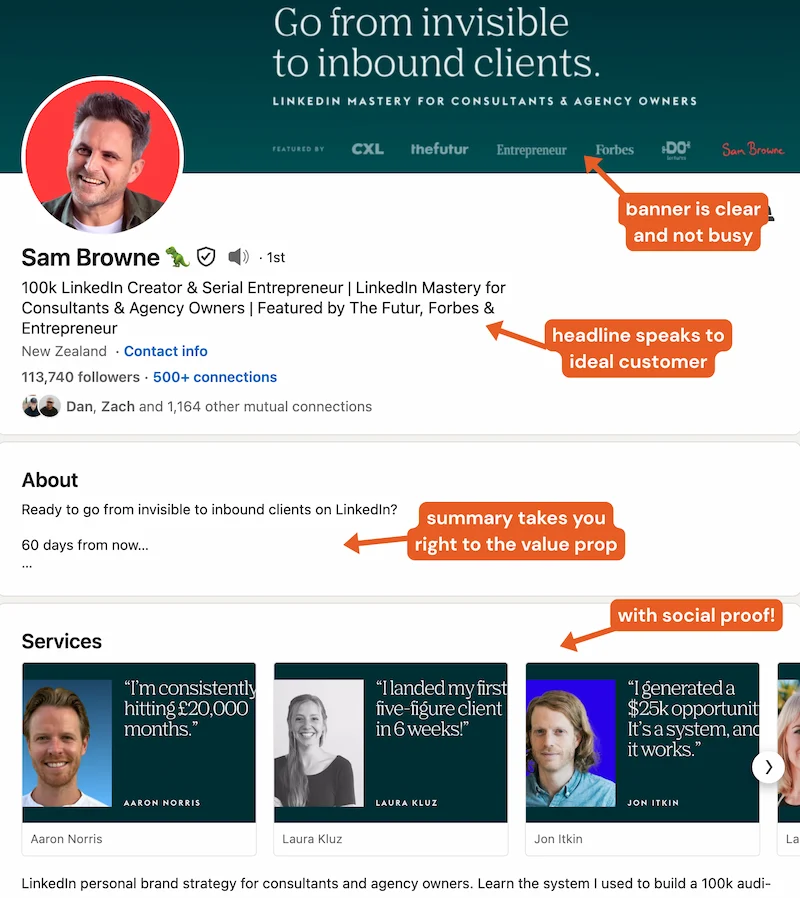
Now for the part that people find most satisfying to work on: how your profile actually looks. Once you know who's following you and whether they match your target client, design choices become a lot easier to make.
Overall Design Feel
Think about the first impression your profile creates. Are you projecting the right level of seniority and sophistication for the clients you want? The goal is to look like someone who belongs in that buyer's world: a credible peer solving a problem they recognize.
Carousel & Infographic Design
Professional design skills aren't required here. But intentionality is. Does the visual style of your carousels and infographics look like something a credible expert in your field would publish? If a prospect saw your content before your pitch, would it raise or lower their confidence in you?
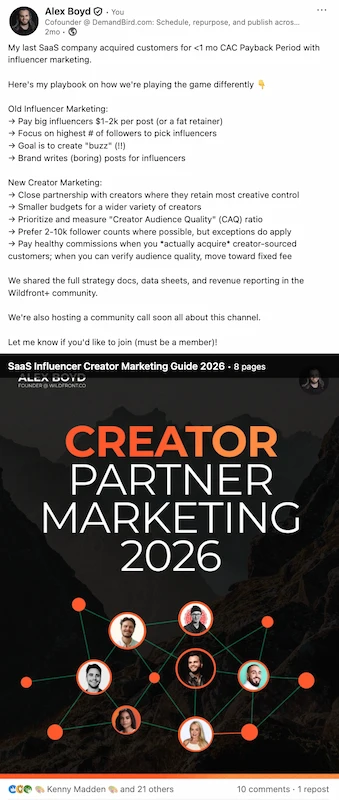
Design that feels native to your audience's world builds quiet credibility before you've said a word. Design that doesn't creates friction at exactly the moment you need trust.
4. Publish On-Brand Posts With a LinkedIn Scheduling Tool
Once your content strategy is clear, the next lever is consistency. Drafting and scheduling posts in advance, whether by hand or with an AI assistant tuned to your voice, removes the daily friction that derails most creators:
Three questions to pressure-test your content before it goes out:
- Does the writing voice in this post match the positioning on your profile, or does it create a disconnect for someone who clicks through?
- Would a first-time visitor scrolling your last five posts immediately understand what you do and who you do it for?
- Is the format (text-only, carousel, video) the right choice for this specific message, or did you default to it out of habit?
5. Build Optimized Feeds With a LinkedIn Engagement Tool
Here's the thing most people miss about LinkedIn profile optimization: the biggest variable isn't your banner, your headline, or even your post frequency. It's who you're engaging with. Your comment footprint shapes how LinkedIn categorizes you and who sees your content. LinkedIn's relevance model treats your engagement history as a primary signal, not a secondary one.
A dedicated engagement tool lets you build curated feeds around the people you actually want relationships with: prospects, industry voices, potential partners. Commenting strategically through those feeds builds visibility in a way that feels natural and valuable rather than pushy:
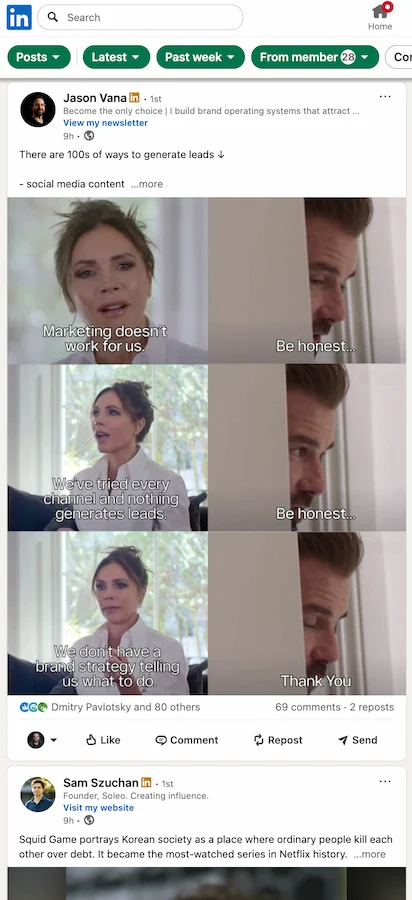
Three things to get right when you're building engagement feeds:
- Be deliberate about who you add.
Go beyond prospects. Include thought leaders in your target space, even if they're never going to buy from you. Their audience sees your comments. If you're pivoting into a new niche, engaging with its influential voices is one of the fastest ways to reposition your profile in LinkedIn's eyes. - Add enough people to matter.
Most creators who've done this successfully keep at least 50 profiles spread across their feeds, divided between prospects, peers, and influential voices in their space. Too few and you run dry in minutes; too many and the feed loses its targeting value. - Actually use the feeds, on a schedule.
The LinkedIn native feed will pull you into a scroll loop with no targeting and questionable ROI. Block 20 minutes in the morning, work through your curated feeds, and aim for 30 substantive comments before closing the tab. Structure beats willpower every time.
Main Takeaways
Run through these in order:
- Check your follower demographics first. If the people following you don't match your ideal client, every other optimization is working against you.
- Diagnose your content performance honestly. Low engagement despite decent reach: your content isn't resonating. Decent engagement but low reach: your network needs expanding.
- Audit your visual brand for fit. Would your target client look at your design and think "this person belongs in my world"? If not, that's costing you.
- Publish with intention, not habit. Right time for your audience's geography, right format for the message, consistent voice that matches your profile.
- Engage daily from curated feeds, not the native feed. The native feed optimizes for time-on-platform, not for your goals. Build feeds around the people who matter and work through them on a schedule.
Frequently asked questions
Do you need a paid LinkedIn tool to optimize your presence?
You sure don't! LinkedIn's built-in analytics cover a lot. While many top creators leverage and swear by a range of tools, other creators advocate a completely tool-free existence. It's up to you. At DemandBird, we use, well... DemandBird... and a couple of others. But we try to avoid tool overload.
What's the difference between LinkedIn's native analytics and third-party tools?
LinkedIn's native analytics give you non-exportable impressions data for certain recent time frames but not all, post-level performance data but not in a scalably-readable way, and basic follower demographics. You can also export your data from LinkedIn, import it to DemandBird, and get a LOT more depth and scalability in your analytics that way, too, all safely, and without needing to put your account at risk by using an unsanctioned "chrome extension tool".
How do you know if your LinkedIn audience matches your target customer?
First, look at your follower demographics in your analytics section, either on LinkedIn or in DemandBird. Do these match what you expect? Secondly, does your professional background, profile Summary and Headline, and post history, all work together to support the target customer you're currently trying to reach? If not, change those.
What's the best LinkedIn scheduling tool?
DemandBird is what we use in-house, and we've generated a cumulative $8M+ of revenue for our relatively small portfolio of companies, in the last several years, just from LinkedIn! It's pretty incredible. We think DemandBird is a great fit for LinkedIn creators and teams who want to be more efficient at LinkedIn content ops, but also at expanding their horizons to other social channels as well.
How much time should LinkedIn optimization take each week?
Review your profile, photo, summary, headline, settings, and so forth, less than once a week. Probably more like once a month. Spend less time fiddling, and more time actually doing, on social, and you'll win!
Understand what's working on your LinkedIn
DemandBird helps B2B teams grow their social media presence, without the guesswork.
Start Free Trial