
LinkedIn Premium adds exactly one meaningful analytics upgrade over the free plan: you can see the full list of who viewed your profile. Post analytics and company page analytics are identical across every plan tier. The Social Selling Index (SSI) is the exception — it now requires a paid subscription to access.
If you're considering upgrading primarily for better LinkedIn analytics, this guide will save you the money. If you're upgrading for search, InMail, or lead generation: that's a different conversation. Here's the complete breakdown.
Analytics Comparison Across All LinkedIn Plans
LinkedIn currently offers four plan tiers relevant to most professionals and B2B teams: Free, Premium Career ($29.99/mo), Premium Business ($59.99/mo), and Sales Navigator Core ($159.99/mo). Here's how they stack up for analytics specifically:
| Analytics feature | Free | Premium Career | Premium Business | Sales Navigator |
|---|---|---|---|---|
| Post impressions | ✓ | ✓ | ✓ | ✓ |
| Reactions & comments per post | ✓ | ✓ | ✓ | ✓ |
| Audience breakdown (company, title, region) | Top 8 | Top 8 | Top 8 | Top 8 |
| Profile viewers: last 5 only | ✓ | — | — | — |
| Full profile viewer history (90 days) | ✗ | ✓ | ✓ | ✓ |
| Post performance trend lines | ✗ | ✗ | ✗ | ✗ |
| Share count per post | ✗ | ✗ | ✗ | ✗ |
| Company / page analytics | ✓ | ✓ | ✓ | ✓ |
| Social Selling Index (SSI) | ✗ | ✓ | ✓ | ✓ |
| InMail credits / month | ✗ | 5 | 15 | 50 |
| Advanced search filters | ✗ | Limited | Limited | ✓ Full |
The pattern is clear: analytics features are largely flat across tiers. The only analytics-relevant difference is the profile viewer history unlocked at every paid plan. Everything else (post metrics, audience breakdowns, company pages, SSI) is available for free.
Premium Gives You Much Better Profile Viewer Data
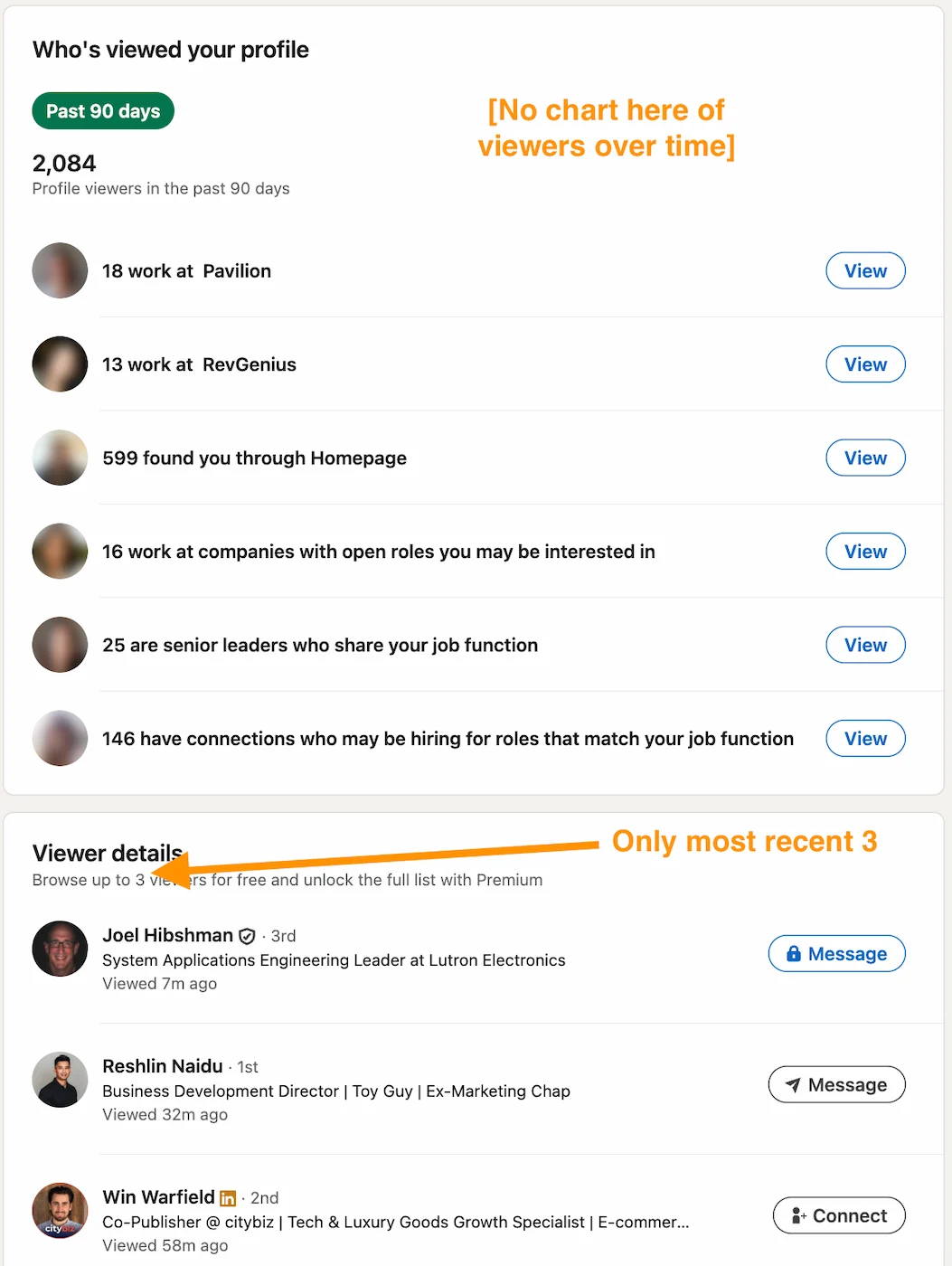
On the free plan, LinkedIn shows you only the last 5 people who viewed your profile, often with limited information about anonymous viewers:
Upgrade to any paid plan (Premium Career, Premium Business, or Sales Navigator) and you get the full 90-day viewer history with each visitor's name, job title, company, and how they found you:
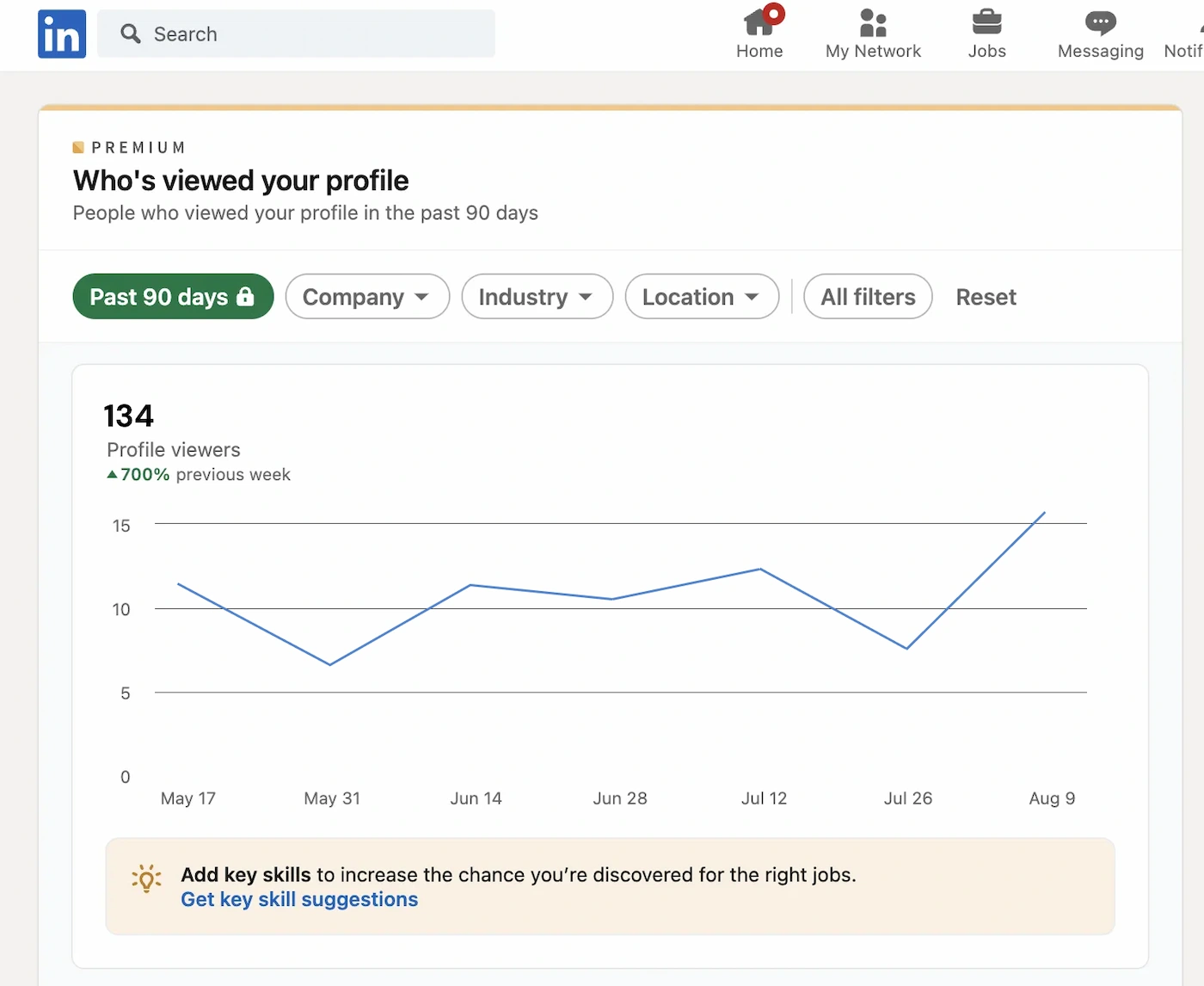
This is genuinely useful if you're in sales: knowing which prospects visited your profile before you reach out is valuable context. It's less useful for content creators whose goal is growing an audience.
For a deeper look at LinkedIn Premium's full feature set beyond analytics, see our guide: Is LinkedIn Premium worth it?
Content Stats Are The Same Between Plans
Post analytics is the area where paying more buys you nothing. LinkedIn's content stats are the same on every plan tier: free, Premium, and Sales Navigator all show identical data.
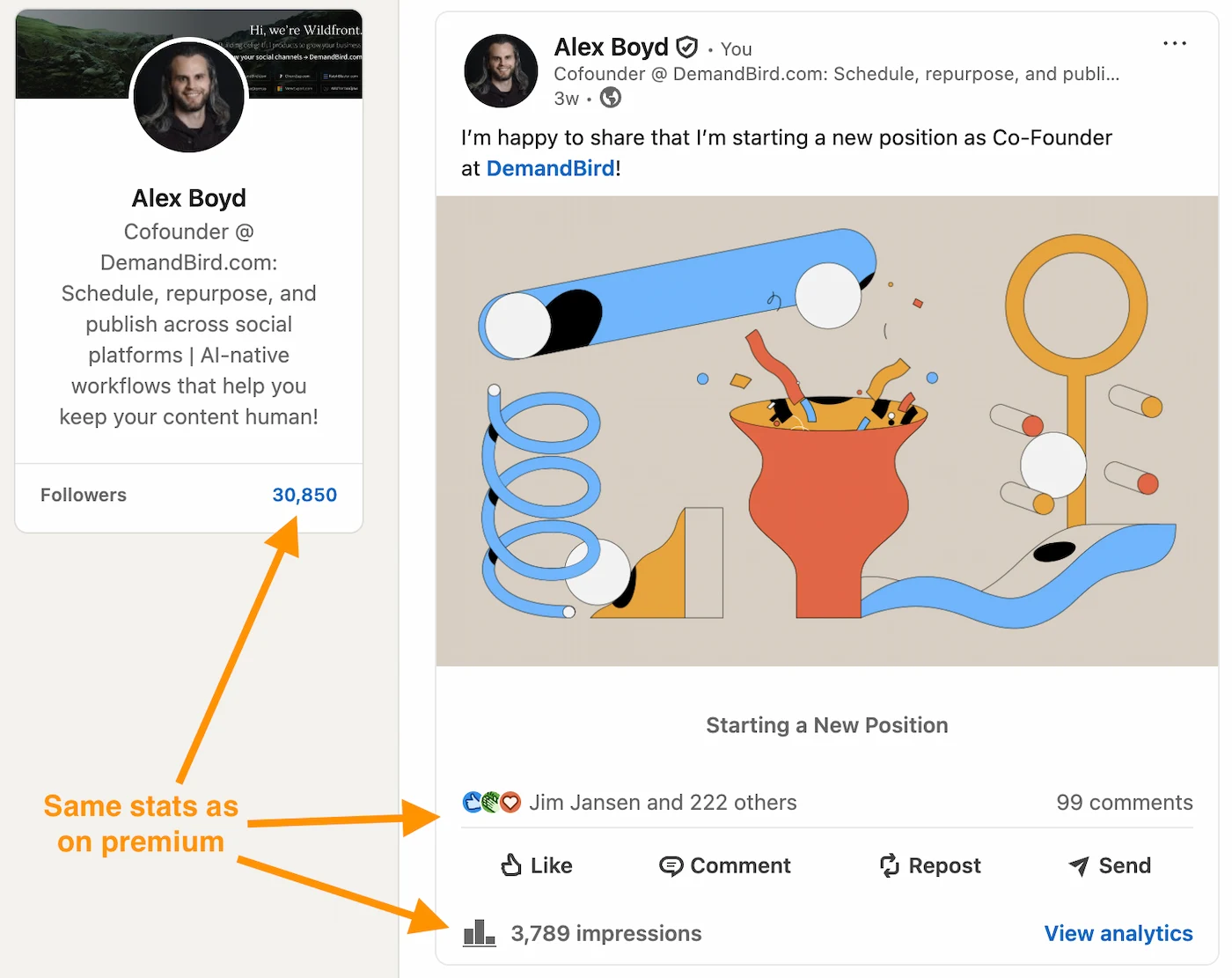
On any plan, each post shows you:
- Impressions: how many times the post appeared in a feed
- Reactions: total likes, celebrates, loves, etc.
- Comments: total comment count
- Top 8 viewers by company: which organisations are seeing your content
- Top 8 viewers by job title: which roles are engaging
- Top 8 viewers by region: geographic breakdown
Notably absent on all plans: share counts, click-through data on link posts, reposts vs. original impressions, and any trend view showing how your content performance changes over time.
Data You Won't Get From Standard Analytics
Regardless of what plan you're on, LinkedIn's native analytics have real blind spots that matter if you're serious about growing engagement on LinkedIn:
- No share or repost count. Shares are one of the strongest signals of resonance and the best driver of viral reach: LinkedIn doesn't show this natively.
- No trend lines. You can see how a single post performed, but there's no view showing impressions per week, follower growth rate, or how your engagement ratio changes over time.
- No click data on external links. If you post a link to your website, LinkedIn shows impressions and reactions but not how many people actually clicked.
- No follower quality breakdown. You can see follower count but not whether your new followers match your target audience in terms of seniority, industry, or company size.
- No post-type comparison. LinkedIn won't tell you whether text-only posts outperform carousels or documents for your specific audience.
These gaps exist across every paid tier. Premium analytics are not a replacement for a proper LinkedIn statistics tracking workflow. If you want post performance history, engagement trends, and network growth tracked in one place, DemandBird is built specifically for that: it surfaces which posts are driving profile views and inbound conversations, and shows how your network and reach are moving over time.
LinkedIn Business Page Analytics
Company page analytics follow the same pattern as post analytics: upgrading your plan changes nothing about what you can see. Page admins on the free plan have access to exactly the same reporting as those on Sales Navigator.
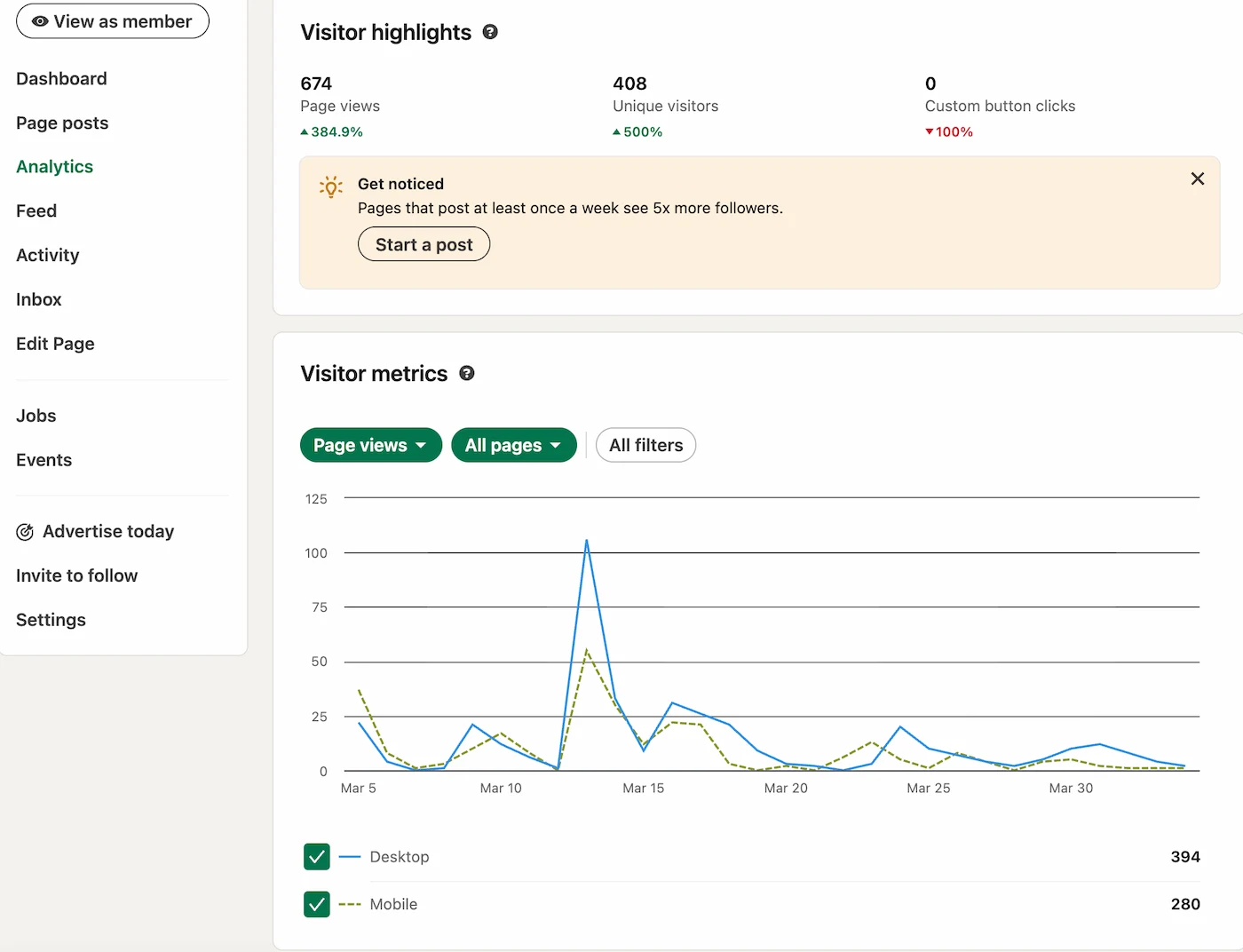
Page admins on any plan can see: page views, unique visitors, follower count and growth, post impressions, and a breakdown of follower demographics (industry, seniority, company size). These are all available for free.
LinkedIn SSI Is Only Available On Paid, But Do You Need It?
The Social Selling Index is LinkedIn's proprietary score measuring how well you establish your brand, find the right people, engage with insights, and build relationships. It used to be available to everyone, but LinkedIn now requires a paid subscription to access it. Free plan members will see a prompt to upgrade when they try to visit linkedin.com/sales/ssi.
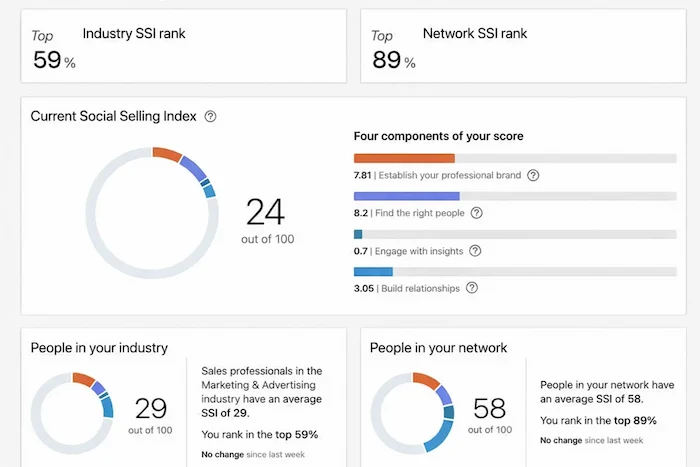
That said, SSI is more of a vanity metric than an actionable one. The four pillars (professional brand, finding the right people, engaging with insights, building relationships) are directionally useful as a checklist, but the score itself doesn't correlate strongly with pipeline or revenue. If you're on a paid plan and want to track it, our guide to the LinkedIn Social Selling Index explains what each pillar means and how to improve it. If you're on a free plan, you're not missing much.
Verdict: Should You Upgrade for Analytics?
LinkedIn Premium adds exactly one analytics feature: full profile viewer history. Post analytics, company page analytics, and SSI are free. If analytics is your reason for upgrading, it's not worth it.
There are legitimate reasons to pay for LinkedIn. InMail credits, expanded search filters, and Sales Navigator's CRM integration and lead lists are all genuinely useful tools. But none of that has anything to do with analytics. If you're evaluating plans specifically to get more data about your content, you'll arrive at the same dashboard you already have.
If your goal is to grow through content, the thing that moves the needle is understanding what you post, not which plan you're on. Grade your posts, spot patterns in your best performers, and iterate. See our LinkedIn optimization tools guide for a fuller toolkit.
Frequently Asked Questions
Does LinkedIn Premium show you who viewed your profile?
Yes. On the free plan you can only see the last 5 profile viewers with limited detail. LinkedIn Premium Career, Premium Business, and Sales Navigator all unlock the full list of who viewed your profile in the past 90 days, including their name, job title, and company.
Is LinkedIn Premium worth it for content analytics?
No. LinkedIn Premium does not add any additional post or content analytics. Impressions, reactions, comments, and the top-8 audience breakdown by company, title, and region are all available on the free plan. Premium's only analytics advantage is profile viewer history.
Does Sales Navigator have better analytics than LinkedIn Premium?
For content analytics, no. Post impressions, reactions, and audience breakdowns are identical across free and Sales Navigator. Where Sales Navigator stands out is advanced lead search filters, CRM integration, and InMail credits (50/month). Its analytics advantage over the free plan is the same as any Premium tier: full profile viewer history.
What analytics does the LinkedIn free plan include?
The free plan includes post impressions, reactions, comments, and a top-8 breakdown of your viewers by company, job title, and region. You also get full company page analytics. The Social Selling Index now requires a paid plan to access. The only meaningful thing you're missing vs. paid plans is full profile visitor history beyond the last 5 viewers.
Understand what's working on your LinkedIn
DemandBird helps B2B teams grow their social media presence, without the guesswork.
Start Free Trial