What it makes
The carousel studio turns a list of slide text into a designed, swipeable set of slides, and hands the result to the editor as a draft.
Find it at Carousel in the app.
Where carousels can go
| Platform | How it publishes |
|---|---|
| Native image carousel | |
| Threads | Native image carousel |
| A swipeable PDF document |
LinkedIn has no multi-image carousel. Its slides are assembled into a PDF at publish time, which is what LinkedIn's document post renders as a swipeable deck. This happens automatically; you do not build it differently.
Any other platform would render a set of slides as a static grid of pictures, which is not a carousel, so the studio does not offer them.
Writing the slides
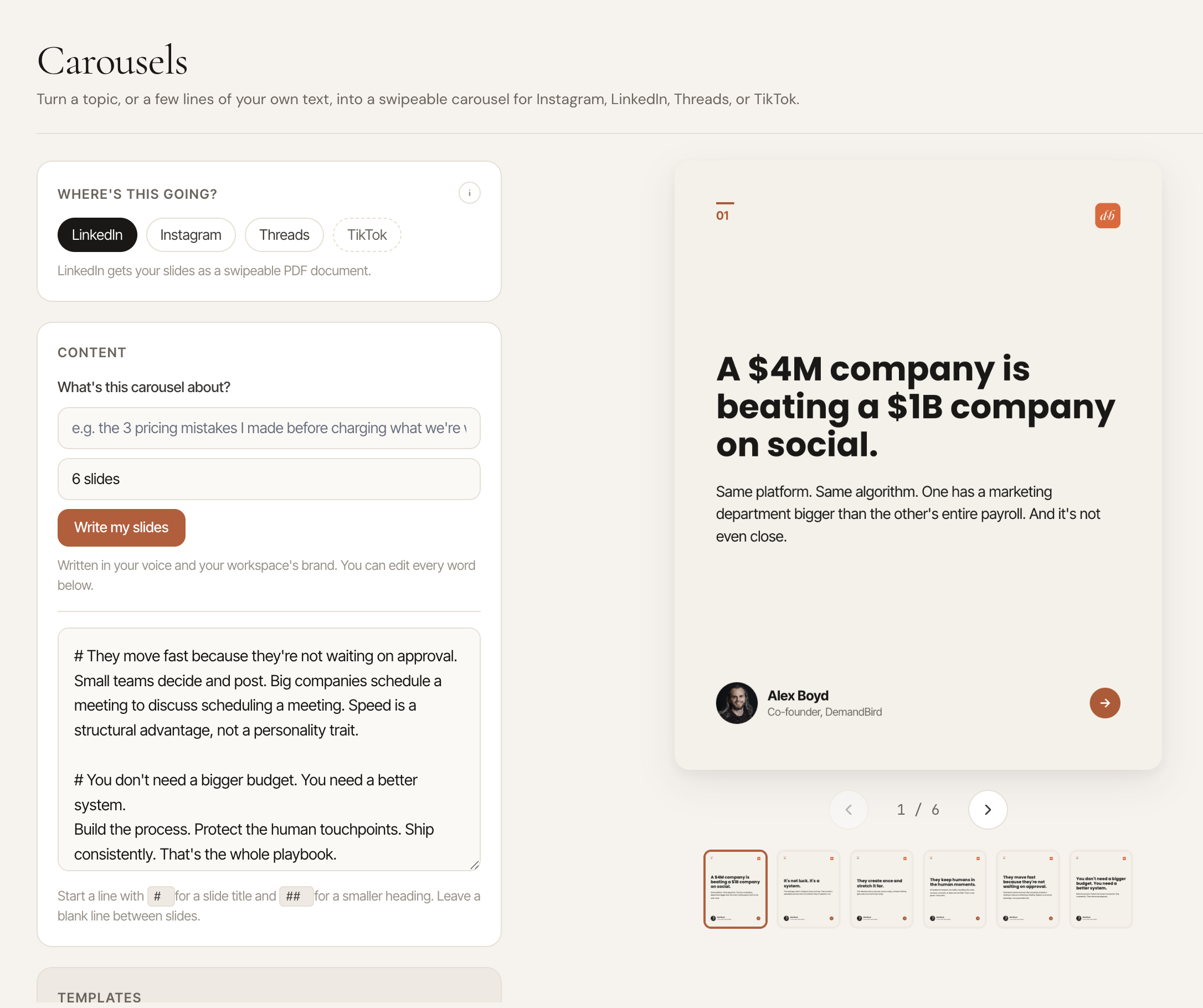
You type slides as plain text, one block per slide, and the preview updates as you go. Everything is rendered in your browser — nothing is uploaded until you hand the result to a post.
If you would rather start from a topic, Write my slides takes a subject and a slide count and drafts the copy for you, in your voice and with your workspace's brand positioning applied. It comes back as ordinary editable text in the same box, so you can rewrite any of it.
That counts as one AI draft against your monthly drafting allowance.
Branding
The studio opens wearing your workspace's brand kit, set at Settings → Brand kit:
- The kit's accent, ink and canvas colors
- Its font pairing
- Its default slide shape
- The kit icon, or the workspace logo if there is no icon, in the slide corner
Your name and avatar fill the author line.
Changing any of these in the studio does not change the kit. Reset to kit puts the studio back to the kit's colors, font and shape.
Background photos
A slide can sit on a photo. Once you pick one, three controls frame it:
- Color wash: how much of your theme color covers the photo, from 0 to 100%. At 0 you see the bare photo.
- Zoom: from 100 to 300%.
- Position: drag the preview to move the photo, or use Recenter to put it back in the middle.
Templates
Save a design you like as a template and reuse it. Templates store the look, not the words, so a saved template plus new slide text gets you a consistent-looking deck in seconds. That includes a background photo's color wash, zoom and position, so the photo keeps its crop when you reuse the template.
Templates belong to the workspace they were saved in. Each client workspace has its own set, and you do not see one client's templates in another client's studio. An account can save up to 20 templates in total.
Sending it to a post
Use in post exports the slides and creates a draft with them attached: slide PNGs for Instagram and Threads, or a single PDF for LinkedIn.
From there it is a normal post: write the caption, choose channels, queue or schedule it. See Scheduling & the queue.
Limits
A handoff carries up to 35 slides, which is the highest any platform allows. Each platform's own limit is enforced when you schedule, so a 30-slide deck aimed at a platform that caps lower is caught then and told to you, rather than failing at publish.
Images and documents cannot be mixed on one post. A LinkedIn carousel is the PDF and nothing else.
Availability
Available on every plan. Write my slides uses your AI drafting allowance, which differs by plan.