Opening it
Click Client calendar in the sidebar, under Clients. It shows scheduled posts across every workspace you belong to, each one badged and coloured with its client's mark. Your per-workspace calendar is still there and unchanged; this is the view on top of all of them.
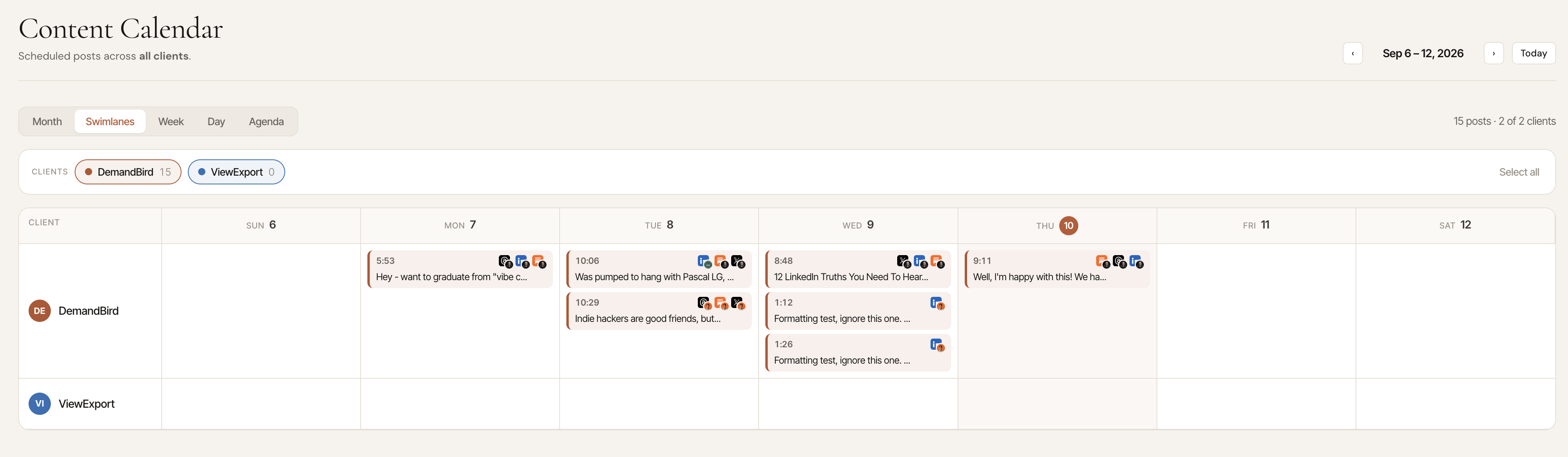
Five layouts
| View | Best for |
|---|---|
| Month | The default. A normal month grid with every client mixed together. |
| Swimlanes | One row per client. The fastest way to spot the client with nothing booked next week. |
| Week | The next seven days in detail. |
| Day | A single day, hour by hour — useful when several clients publish the same morning. |
| Agenda | A plain chronological list. Easiest to scan on a phone. |
Whichever layout you're in, the counts in the toolbar always summarise the anchor's calendar month (“24 posts · 8 of 8 clients”), so scrubbing through weeks doesn't make the headline number jump around.
Showing and hiding clients
Each client has a chip above the calendar. Click one to drop that client out of the view; click again to bring them back. There's a “select all” to clear every exclusion at once.
Your choices are saved to your own login, not the account, so hiding a client on your calendar doesn't change anyone else's.
What an entry represents
- One entry per post, not per platform. A post going to LinkedIn and Bluesky is a single block listing both, dated at the earlier of the two times.
- Greyed-out entries are future cycles of a recycled (evergreen) post that haven't been booked yet. They're shown so a repeating post doesn't look like a one-off, and they're left out of every count.
Who can see it
| Seat | What they see |
|---|---|
| Admin | Every workspace on the account. |
| Member | Every workspace they belong to. |
| Ghostwriter | Their workspaces, but only their own posts within each. |
| Client | Nothing — clients get the approvals page instead, and are left out of this view entirely. |
Limits
Workspaces you've archived don't appear. Un-archive a client to bring their posts back onto the calendar.
Related views
- Pipeline: every client's editorial queue, including scheduled posts that aren't approved yet.
- Client posts: how every client's LinkedIn posts performed, in one sortable table.