What is MCP?
The Model Context Protocol (MCP) lets Claude connect to external tools and services. With the DemandBird MCP server connected, Claude can read your drafts, generate AI-written posts in your voice, schedule content, and manage your queue — all through natural conversation.
Setup
- Get your API tokenIn DemandBird, go to Settings → API Tokens and create a token. Copy it — you'll need it in the next step. (What to scope it to.)
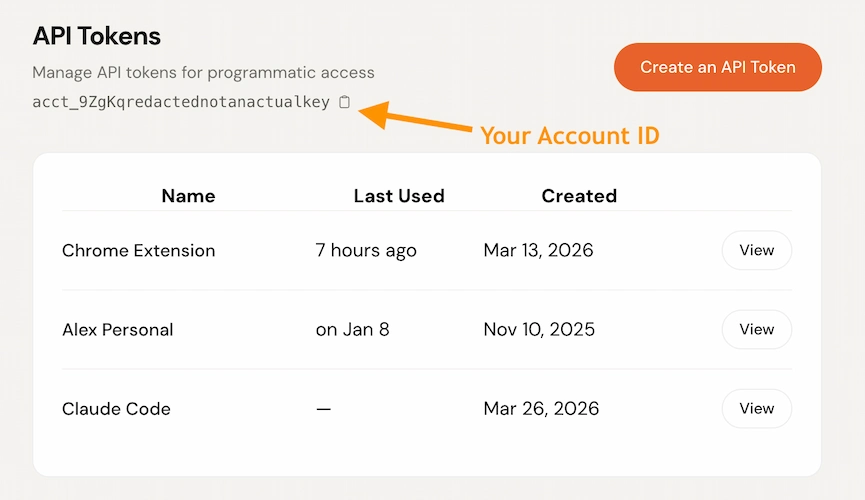
- Configure your Claude appFollow the Claude Desktop or Claude Code instructions below.
Claude Desktop
Open (or create) ~/Library/Application Support/Claude/claude_desktop_config.jsonand add the demandbird server under mcpServers:
{
  "mcpServers": {
    "demandbird": {
      "type": "http",
      "url": "https://app.demandbird.com/mcp",
      "headers": {
        "Authorization": "Bearer your-token-here"
      }
    }
  }
}X-Account-Id header with your account ID to set a default account. You can find your account ID on the Settings page. If omitted, Claude will ask which account to use."headers": {
"Authorization": "Bearer your-token-here",
"X-Account-Id": "acct_your-account-id"
}%APPDATA%\Claude\claude_desktop_config.json.Claude Code
This works for Claude Code in the terminal, VS Code, JetBrains, and the desktop app.
Run this command in your terminal:
claude mcp add --transport http demandbird https://app.demandbird.com/mcp \
  --header "Authorization: Bearer your-token-here"
Or add it manually to ~/.claude.json:
{
  "mcpServers": {
    "demandbird": {
      "type": "http",
      "url": "https://app.demandbird.com/mcp",
      "headers": {
        "Authorization": "Bearer your-token-here"
      }
    }
  }
}--header "X-Account-Id: acct_your-account-id" to set a default. If omitted, Claude will ask which account to use.Example prompts
Once connected, you can talk to DemandBird in plain English:
Done! Draft saved (post #124). Here's what I wrote: “We just shipped something that's been...”
You have 3 drafts:
• Post #124: LinkedIn: “We just shipped something...”
• Post #121: Twitter, Threads: “The one thing I wish I knew...”
• Post #118: LinkedIn: “Hot take on AI in marketing...”
Post #124 scheduled for 2026-03-03T09:00:00Z on LinkedIn.
Post #121 queued on Twitter and Threads.
Scheduled times:
• twitter: 2026-03-03T08:00:00Z
• threads: 2026-03-03T10:00:00Z
Tool reference
list_accounts
No parameters required.
select_account
| Parameter | Type | Description |
|---|---|---|
| account_idrequired | string | Account prefix ID (e.g., acct_xxx) or numeric ID. Use list_accounts to find your IDs. |
get_brand_voice
| Parameter | Type | Description |
|---|---|---|
| platformoptional | string | Also return recent before-and-after edits captured for this platform. Same values as draft_post. |
draft_post and revise_draft already apply your voice and brand, so you don't need this for them. It is for when Claude writes the words itself and saves them with save_draft or update_draft, which store text exactly as given.
draft_post
| Parameter | Type | Description |
|---|---|---|
| promptrequired | string | What to write about. E.g., “a post about launching my new SaaS product” |
| platformoptional | string | Target platform: linkedin, twitter, threads, bluesky, substack, youtube. Influences tone and length. |
| youtubeoptional | object | YouTube-specific options: { title?, privacy_status?, thumbnail_url? }. title max 100 chars (auto-derived from the first line if omitted); privacy_status is public, unlisted, or private (defaults to public). A video must be attached via images before the post can be scheduled or published. |
save_draft
| Parameter | Type | Description |
|---|---|---|
| contentrequired | string | The post text to save. |
| platformsoptional | array of strings | Target platforms. Same values as draft_post. |
| youtubeoptional | object | YouTube-specific options. Same shape as draft_post (title, privacy_status, thumbnail_url). |
update_draft
| Parameter | Type | Description |
|---|---|---|
| idrequired | number | Post ID to update. |
| contentoptional | string | New post content. Replaces the existing text. |
| platformsoptional | array of strings | Updated target platforms. Replaces the existing selection. |
| youtubeoptional | object | Replace the YouTube variant fields. Same shape as draft_post. Pass {} to clear them. |
| on_variant_conflictoptional | string | replace or keep. When you change content, channel copies that still matched the draft are updated along with it. If a channel copy was edited separately, the call is refused and names those channels. Re-send with on_variant_conflict: "replace" to apply the new content there too, or "keep" to leave those channels as they are. |
revise_draft
| Parameter | Type | Description |
|---|---|---|
| idrequired | number | Post ID of the draft to revise, as returned by draft_post, save_draft or list_drafts. |
| feedbackrequired | string | What you want changed, in your own words. |
| platformoptional | string | The platform whose length limit the rewrite should fit. Defaults to the post's first platform. It does not change where the post publishes. |
| draft_anywayoptional | boolean | Set true to rewrite with what it has instead of asking for more context. |
| on_variant_conflictoptional | string | replace or keep. Same as on update_draft: if a channel has its own tailored copy, the call is refused and names it until you choose. |
Use this every time you react to a draft. Calling draft_post again creates a second, unrelated draft instead, and leaves the first one (and its images) where it was. Each call uses one AI rewrite from your monthly allowance.
attach_reference
| Parameter | Type | Description |
|---|---|---|
| post_idrequired | number | Post ID to attach the reference to. |
| textoptional | string | The source material itself, stored as given. Up to 200,000 characters. Give exactly one of text or url. |
| urloptional | string | A link to the source. The page is fetched in the background, and the link is kept even if the fetch fails. Give exactly one of text or url. |
| titleoptional | string | A label. Taken from the first line of text when left out. |
Never put source material in content. Whatever is in content on save_draft or update_draft gets published. A post holds up to 20 references. Attaching one makes no AI call.
list_drafts
| Parameter | Type | Description |
|---|---|---|
| statusoptional | string | One of: draft, scheduled, posted, failed. Defaults to draft. |
| limitoptional | number | Max posts to return (default 20, max 100). |
get_post
| Parameter | Type | Description |
|---|---|---|
| idrequired | number | Post ID. |
Also lists the post's reference materials: title, url, kind, length and status. It does not return their text.
delete_post
| Parameter | Type | Description |
|---|---|---|
| idrequired | number | Post ID to delete. |
schedule_post
| Parameter | Type | Description |
|---|---|---|
| idrequired | number | Post ID to schedule. |
| scheduled_atrequired | string (ISO 8601) | When to publish. E.g., 2026-03-10T09:00:00Z. Must be in the future. |
| platformsoptional | array of strings | Platforms to schedule on. If omitted, uses platforms already set on the post. |
queue_post
| Parameter | Type | Description |
|---|---|---|
| idrequired | number | Post ID to queue. |
| platformsoptional | array of strings | Platforms to queue for. If omitted, uses platforms already set on the post. |
Returns the exact scheduled time for each platform based on your posting queue. Use get_queue_slots first if you want to see available times before queueing.
get_queue_slots
| Parameter | Type | Description |
|---|---|---|
| platformsrequired | array of strings | Platforms to check. E.g., ["linkedin", "twitter"]. |
list_connected_accounts
| Parameter | Type | Description |
|---|---|---|
| platformoptional | string | Filter to a single platform. Same values as draft_post. |
Use the returned ids with platform_account_ids on schedule_post or queue_post to post from a specific account.
request_review
| Parameter | Type | Description |
|---|---|---|
| post_idrequired | string | ID of the draft to send for review. |
| reviewersrequired | array of objects | Each reviewer needs either email (their email on this account) oruser_id. Set required: false to make a reviewer optional; defaults to true. |
| noteoptional | string | A message to include when notifying the reviewers. |
| scheduled_atoptional | string (ISO 8601) | Pre-schedule the post. It will auto-publish at this time if every required reviewer has approved by then. |
list_posts_awaiting_my_review
| Parameter | Type | Description |
|---|---|---|
| limitoptional | number | Max posts to return (1–100, default 20). |
upload_image
s3_key to reference on draft_post, save_draft, or update_draft.| Parameter | Type | Description |
|---|---|---|
| filenamerequired | string | Original filename (e.g. photo.jpg). |
| content_typeoptional | string | MIME type. Inferred from the filename extension if omitted. Supports images (JPEG, PNG, GIF, WebP) and videos (MP4, MOV, AVI, WebM, MKV). |
generate_image
| Parameter | Type | Description |
|---|---|---|
| promptrequired | string | What the image should show. Describe the picture, not the post. |
| styleoptional | string | photo, illustration, infographic or diagram. Defaults to illustration. |
| sizeoptional | string | square (1:1), portrait (2:3) or landscape (3:2). Defaults to square. |
Returns an s3_key to pass to draft_post, save_draft or update_draft in images. If you already have a picture, use upload_image instead. See AI images.
Analytics tools
These tools are read-only. Every number comes from the same data as the Analytics tab. Reddit is not included.
platform takes one of twitter, bluesky, threads, facebook, instagram, mastodon, youtube, tiktok, pinterest or linkedin. period takes 7d, 30d or 90d, and defaults to 30d.
get_analytics_summary
platform for a roll-up across every connected network.| Parameter | Type | Description |
|---|---|---|
| platformoptional | string | Focus on one network. Omit for all of them. |
| periodoptional | string | Time window. Default 30d. |
list_top_posts
| Parameter | Type | Description |
|---|---|---|
| platformoptional | string | Rank posts from one network. Omit for all of them. |
| metricoptional | string | engagement_rate, engagements, reach, likes, comments or shares. Default engagement_rate. Some platforms don't report reach or engagement rate. |
| orderoptional | string | top (best) or bottom (worst). Default top. |
| periodoptional | string | Time window. Default 30d. |
| limitoptional | number | How many posts (default 5, max 20). |
get_post_analytics
post_id, or by platform with latest: true.| Parameter | Type | Description |
|---|---|---|
| post_idoptional | number | The post's id, for example from list_top_posts. |
| platformoptional | string | The network to take the latest post from. Use with latest. |
| latestoptional | boolean | Set true with platform to get that network's most recent post. |
get_best_time_to_post
| Parameter | Type | Description |
|---|---|---|
| platformrequired | string | The network to look at. |
| periodoptional | string | Time window. Default 30d. |
| limitoptional | number | How many time slots (default 3, max 10). |
get_format_performance
| Parameter | Type | Description |
|---|---|---|
| platformrequired | string | The network to look at. |
| periodoptional | string | Time window. Default 30d. |
get_audience_demographics
| Parameter | Type | Description |
|---|---|---|
| platformrequired | string | The network to look at. |
| periodoptional | string | Time window. Default 30d. |